

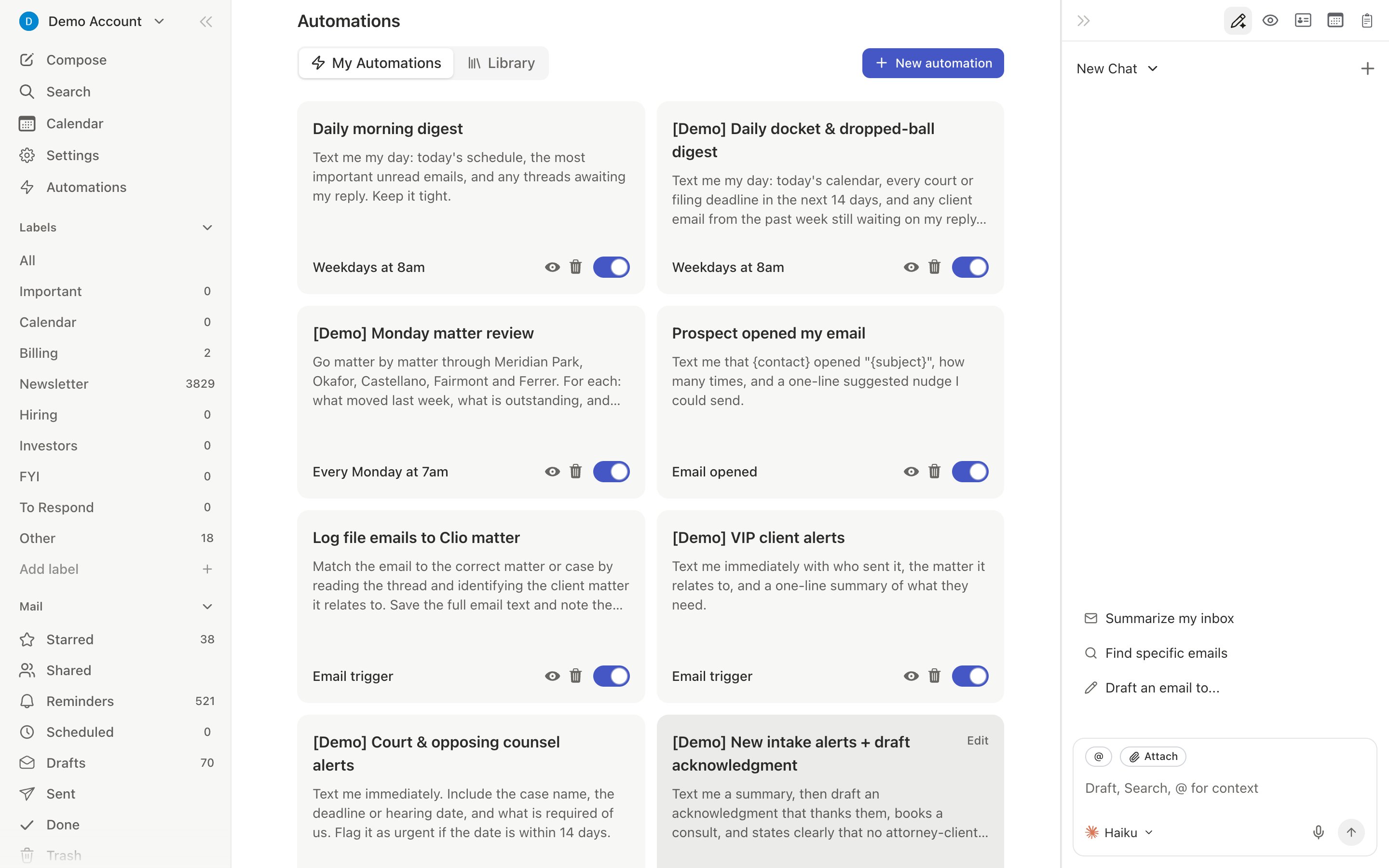
d a) or by activating a template directly from the Automations page (left sidebar lightning bolt, or Cmd+K → “Automations”). The Automations page has more than 40 templates organized by category, including Weekly Inbox Clean Up and a personalized “Popular with [your role]” section.
1. Meeting Confirmation Follow-Ups
1. Meeting Confirmation Follow-Ups
Auto-checks your calendar when someone confirms a meeting and drafts a confirmation or flags conflicts.Open the agent sidebar and say: “When someone confirms a meeting time, check my calendar for conflicts. If none, draft a short confirmation. If there’s a conflict, message me on iMessage.”Tip: Add “only for meetings with external participants” to skip internal confirmations.
2. Receipt Forwarding (Expensify/Ramp)
2. Receipt Forwarding (Expensify/Ramp)
Forwards receipt and payment confirmation emails to your expense tool automatically.Tell the agent: “When I receive a receipt or payment confirmation, forward it to receipts@expensify.com”Replace the address with your Expensify, Ramp, or Brex intake email.Tip: Be specific — say “receipts and invoices, but not subscription renewal notices” to keep your expense tool clean.
3. Daily Dropped Ball Scanner
3. Daily Dropped Ball Scanner
Every morning, scans for emails you sent with no reply, emails you never responded to, and commitments you haven’t fulfilled. Sends a summary via iMessage.Tell the agent: “Every weekday at 8am, scan my inbox for dropped balls — emails I sent with no reply in 7 days, emails I didn’t respond to, and commitments I haven’t followed up on. Send summary on iMessage.”The agent creates a recurring reminder.Tip: Adjust the time to when you start your day. Say “email me the summary” if you prefer email over iMessage.
4. OTP/2FA Forwarding to iMessage
4. OTP/2FA Forwarding to iMessage
Instantly forwards verification codes from email to iMessage so you don’t context-switch.Requires the iMessage agent to be connected.Tell the agent: “When I receive an email with a verification code or OTP, send me the code on iMessage immediately.”The agent extracts just the code number, not the full email body. On iPhone with iOS 18, the Slashy app can also AutoFill emailed codes above the keyboard.
5. VIP Email Alerts
5. VIP Email Alerts
Alerts you on iMessage with a visual preview when specific people email you.Tell the agent: “When I receive an email from jane@bigclient.com or anyone @investor-fund.com, message me on iMessage with a preview.”Tip: You can also trigger on conditions like “any email with ‘urgent’ in the subject.”
6. Meeting Prep Briefing
6. Meeting Prep Briefing
Before each meeting, researches attendees via LinkedIn and your email history, then sends a structured briefing on iMessage.Tell the agent: “10 minutes before any meeting with external attendees, prep me for the meeting and send the briefing on iMessage.”The briefing includes attendee profiles, recent email threads, key topics, and suggested questions.Tip: Narrow with “only for meetings with people outside my company” or “only meetings with ‘investor’ in the title.”
7. Post-Meeting Follow-Up
7. Post-Meeting Follow-Up
Drafts a follow-up email to all attendees with action items after a meeting ends. Integrates with Granola notes if connected.Tell the agent: “5 minutes after any external meeting ends, draft a follow-up email to all attendees with a summary and next steps. Don’t send — just draft.”Tip: Connect Granola in Settings > Integrations for more accurate follow-ups.
8. Weekly Email Summary
8. Weekly Email Summary
Every Friday (or your preferred time), reviews your entire week of email and sends a categorized summary: resolved, pending, owed replies, and threads to watch.Tell the agent: “Every Friday at 3pm, review my email from this week. Summarize what’s resolved, pending, who I owe replies to, and important threads. Send via iMessage.”Tip: Change to Monday mornings for a “week ahead” view.
9. Customer Follow-Up Checker
9. Customer Follow-Up Checker
Monitors key customer threads and flags any where a customer is waiting on you for more than N days.Tell the agent: “Every weekday at 9am, check if any customers from @bigclient.com have emails waiting for my reply for more than 2 days. Message me on iMessage.”Tip: Instead of listing domains, say “any email from someone I’ve exchanged more than 10 emails with” to use relationship data.
10. Email Open Alerts
10. Email Open Alerts
Alerts you when a recipient opens a tracked email. Filters out auto-opens from Gmail Image Proxy, Apple Mail Privacy Protection, and Microsoft SafeLinks.Verify tracking is enabled in Settings > Account under “Email Tracking,” then tell the agent: “When a tracked email I sent to @investor-fund.com is opened for the first time, message me on iMessage.”Tip: Press
d o anytime to view the Recent Opens panel. See Email Tracking for details on tracking limitations.Managing Automations
All automations live in Settings > Automations (Cmd+,). You can toggle, delete, or check recent activity. The same page lists the full template library organized into “Inbox Management,” “Meeting Prep & Scheduling,” “Sales & Pipeline,” “Real-time Alerts,” and “Follow-up Tracking” tabs. You can also manage them from the agent sidebar: ask it to “list my automations” or “disable the receipt forwarding trigger.”
Related Articles
Set Up iMessage Agent
Connect your phone to enable iMessage automations
Automations Overview
How automations work under the hood
Email Triggers
Match conditions in natural language and fire actions
Calendar Triggers
Automate meeting prep and follow-ups
Customize Your Agent
Control your agent’s writing style
Never Miss a Follow-up
Four layers of automated follow-up protection