> ## Documentation Index
> Fetch the complete documentation index at: https://help.slashy.com/llms.txt
> Use this file to discover all available pages before exploring further.
# Slashy for Founders
> Hit inbox zero while running a company. Catch dropped balls, prep for meetings, and track investor emails automatically.
Founders live in email but can't afford to live in email. Slashy keeps your inbox under control so you can focus on building.
## Your Setup Checklist
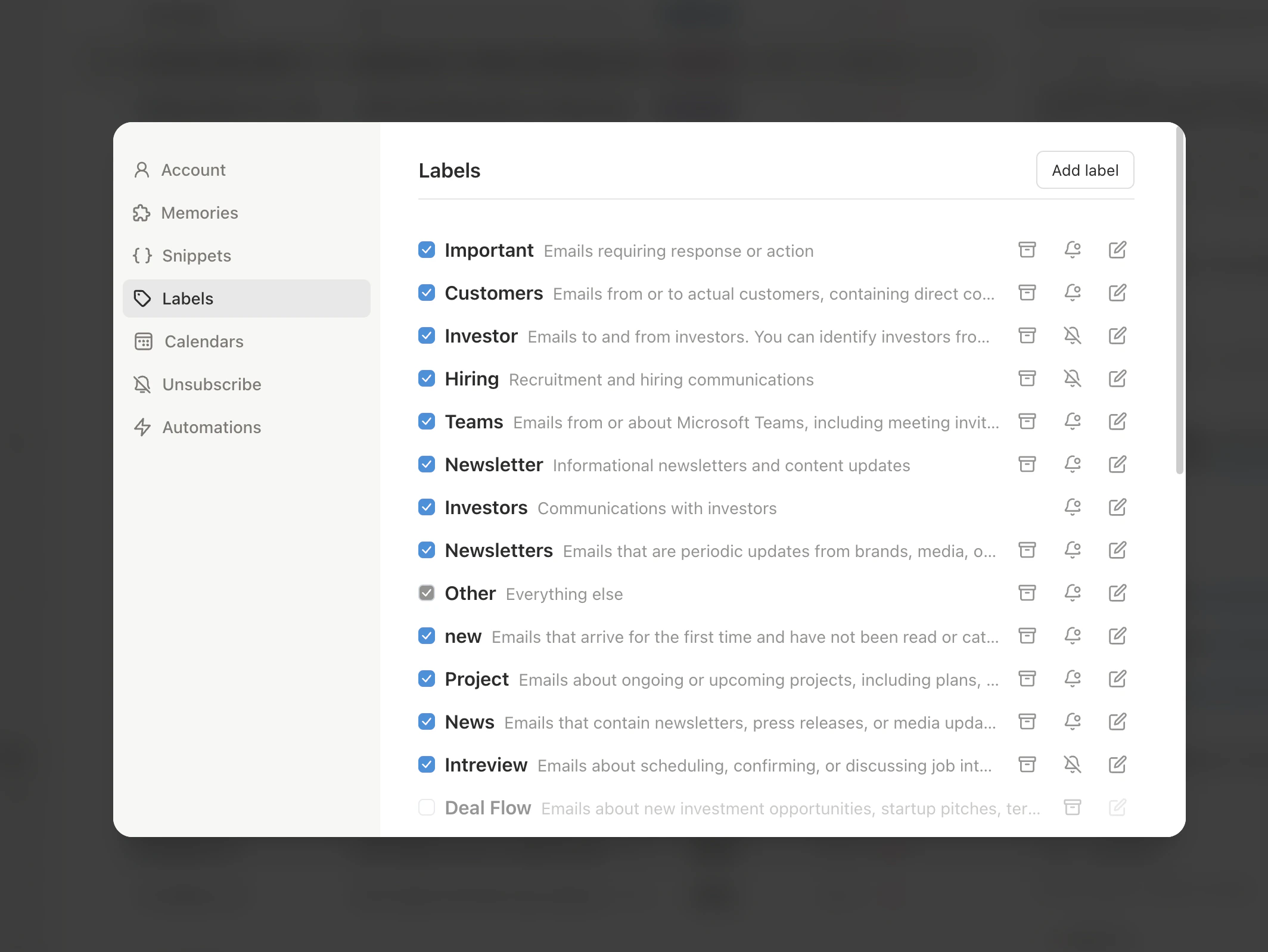
Go to **Settings > Labels** and create VIP labels for board members, investors, and co-founders. Emails from these contacts jump to the top of your inbox automatically.
Link Google Calendar in **Settings > Calendars**. Slashy uses your schedule for meeting prep briefings and availability sharing.
Reply to 5-10 emails using `Cmd+Enter` to generate drafts, then edit before sending. Within a few days, drafts match your tone -- direct for team, polished for investors.
Connect your phone in **Settings > Integrations > Messaging > iMessage**. VIP alerts and dropped ball summaries arrive as texts so nothing slips through when you are away from your laptop.
Press `n s` to create snippets for intros, meeting requests, and investor updates. Insert with `Cmd+Shift+S` to save minutes per email.
 ## Automations For You
Open the AI agent sidebar (`Cmd+Shift+L`) and set up these automations:
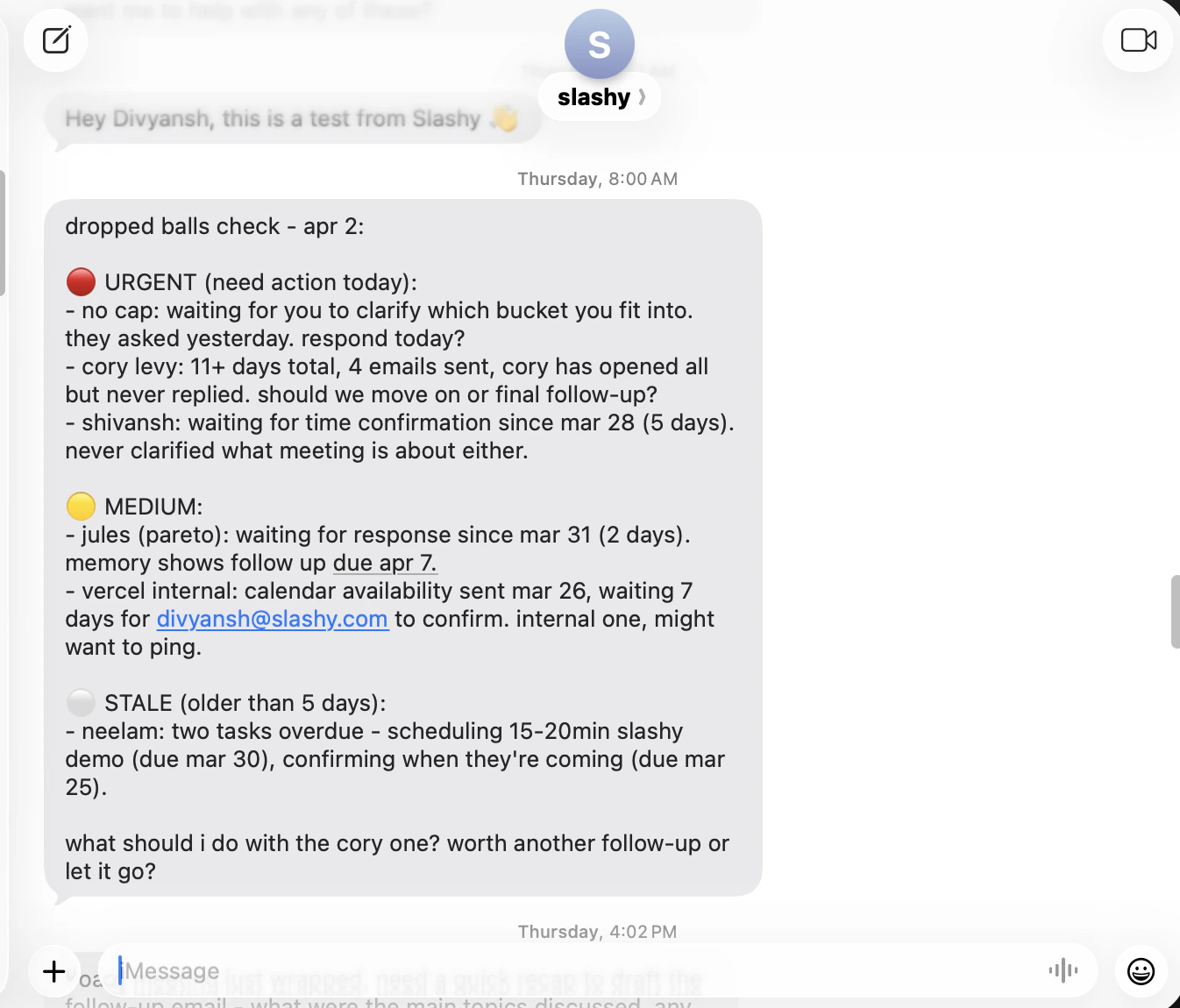
A morning iMessage listing every email you haven't replied to that likely needs a response. Catches the thread that slipped to page two while you were firefighting.
15 minutes before each external meeting, Slashy sends a briefing with the attendee's recent emails, last meeting notes, and any open threads. Walk into every call prepared.
Automatically forwards receipts and invoices to your Expensify or Ramp email address. No more end-of-month receipt hunts.
Enable open tracking (`p o` on any sent email) to see when investors open your fundraise updates. Follow up when they've read it but haven't responded.
## Automations For You
Open the AI agent sidebar (`Cmd+Shift+L`) and set up these automations:
A morning iMessage listing every email you haven't replied to that likely needs a response. Catches the thread that slipped to page two while you were firefighting.
15 minutes before each external meeting, Slashy sends a briefing with the attendee's recent emails, last meeting notes, and any open threads. Walk into every call prepared.
Automatically forwards receipts and invoices to your Expensify or Ramp email address. No more end-of-month receipt hunts.
Enable open tracking (`p o` on any sent email) to see when investors open your fundraise updates. Follow up when they've read it but haven't responded.
 ## Workflow: CEO Morning Email Routine (15 Minutes)
Start every day with a clean inbox and clear priorities. This is the workflow top founders use with Slashy.
Your [daily briefing](/how-to-guides/imessage-briefings) arrives at 8am with today's calendar, VIP emails, and dropped balls. Scan it over coffee. Reply to anything urgent right from iMessage -- *"Reply to Mark saying we'll have metrics by EOD."*
Open Slashy. Your inbox is sorted by importance labels. Start with VIP emails from investors, board members, and co-founders. Use `Cmd+Enter` to generate AI drafts, edit with a few keystrokes, and `Cmd+Shift+Enter` to send.
Use `j`/`k` to navigate, `e` to archive, `Cmd+Enter` to draft. Process 30-50 emails without touching your mouse. Anything that needs more than 2 minutes gets a quick *"Will get back to you today"* draft and a reminder.
Ask the agent: *"What are my dropped balls right now?"* Review the list. Set reminders for anything that needs follow-up this week.
If you have a meeting in the next hour, the [meeting prep briefing](/how-to-guides/meeting-prep) is already waiting. Skim the attendee profiles and open threads so you walk in prepared.
Most founders report hitting inbox zero in under 15 minutes after their first week with Slashy. The key is importance labels -- they ensure you always process the highest-priority emails first.
## Pro Tips
* **Inbox zero in 10 minutes:** Use `j`/`k` to navigate, `e` to archive, `Cmd+Enter` to draft a reply, `Cmd+Shift+Enter` to send. Process 50+ emails without touching your mouse.
* **Board meeting prep:** Ask the agent *"Summarize all board member emails from the last 30 days"* before your next board meeting.
* **VIP alerts only:** Set iMessage alerts to VIP-only mode so you are not buzzed for every newsletter -- just the emails that actually matter.
* **Delegate with context:** Tell the agent *"Forward this thread to \[[ea@company.com](mailto:ea@company.com)] with a summary and ask them to schedule a follow-up."* Your EA gets the full picture without you retyping anything.
## Sample Agent Commands
Try these in the agent sidebar (`Cmd+Shift+L`):
* *"What are my dropped balls right now?"*
* *"Summarize my unread emails and tell me which need a reply today"*
* *"Which investor emails am I behind on?"*
* *"Summarize all board member emails from the last 30 days"*
* *"Draft a monthly investor update with key metrics placeholder"*
* *"When did I last email \[investor name]?"*
* *"Forward this thread to \[[ea@company.com](mailto:ea@company.com)] with a summary and next steps"*
* *"Draft a response to \[team member] approving this and adding a deadline"*
* *"What commitments have I made in email this week?"*
***
## Related Articles
Day-by-day guide to getting fully set up
Full list of triggers, actions, and examples
Four layers of automated follow-up protection
Auto-prep for every meeting with attendee research
## Workflow: CEO Morning Email Routine (15 Minutes)
Start every day with a clean inbox and clear priorities. This is the workflow top founders use with Slashy.
Your [daily briefing](/how-to-guides/imessage-briefings) arrives at 8am with today's calendar, VIP emails, and dropped balls. Scan it over coffee. Reply to anything urgent right from iMessage -- *"Reply to Mark saying we'll have metrics by EOD."*
Open Slashy. Your inbox is sorted by importance labels. Start with VIP emails from investors, board members, and co-founders. Use `Cmd+Enter` to generate AI drafts, edit with a few keystrokes, and `Cmd+Shift+Enter` to send.
Use `j`/`k` to navigate, `e` to archive, `Cmd+Enter` to draft. Process 30-50 emails without touching your mouse. Anything that needs more than 2 minutes gets a quick *"Will get back to you today"* draft and a reminder.
Ask the agent: *"What are my dropped balls right now?"* Review the list. Set reminders for anything that needs follow-up this week.
If you have a meeting in the next hour, the [meeting prep briefing](/how-to-guides/meeting-prep) is already waiting. Skim the attendee profiles and open threads so you walk in prepared.
Most founders report hitting inbox zero in under 15 minutes after their first week with Slashy. The key is importance labels -- they ensure you always process the highest-priority emails first.
## Pro Tips
* **Inbox zero in 10 minutes:** Use `j`/`k` to navigate, `e` to archive, `Cmd+Enter` to draft a reply, `Cmd+Shift+Enter` to send. Process 50+ emails without touching your mouse.
* **Board meeting prep:** Ask the agent *"Summarize all board member emails from the last 30 days"* before your next board meeting.
* **VIP alerts only:** Set iMessage alerts to VIP-only mode so you are not buzzed for every newsletter -- just the emails that actually matter.
* **Delegate with context:** Tell the agent *"Forward this thread to \[[ea@company.com](mailto:ea@company.com)] with a summary and ask them to schedule a follow-up."* Your EA gets the full picture without you retyping anything.
## Sample Agent Commands
Try these in the agent sidebar (`Cmd+Shift+L`):
* *"What are my dropped balls right now?"*
* *"Summarize my unread emails and tell me which need a reply today"*
* *"Which investor emails am I behind on?"*
* *"Summarize all board member emails from the last 30 days"*
* *"Draft a monthly investor update with key metrics placeholder"*
* *"When did I last email \[investor name]?"*
* *"Forward this thread to \[[ea@company.com](mailto:ea@company.com)] with a summary and next steps"*
* *"Draft a response to \[team member] approving this and adding a deadline"*
* *"What commitments have I made in email this week?"*
***
## Related Articles
Day-by-day guide to getting fully set up
Full list of triggers, actions, and examples
Four layers of automated follow-up protection
Auto-prep for every meeting with attendee research