> ## Documentation Index
> Fetch the complete documentation index at: https://help.slashy.com/llms.txt
> Use this file to discover all available pages before exploring further.
# Auto-Prep for Every Meeting
> Set up automatic meeting briefings with attendee profiles, email history, and suggested talking points.
Slashy's AI agent researches every attendee before your meeting -- pulling LinkedIn profiles, email history, and recent news -- then delivers a structured prep doc. Set it up once, and it runs before every qualifying meeting.
## What the Prep Doc Includes
* **Attendee profiles:** Name, title, company, LinkedIn URL, short bio
* **Contact enrichment:** Company size, funding stage, industry
* **Email history:** Recent threads, open action items, last contact date
* **Web search:** Recent news about attendees or their company
* **AI memories:** Stored facts from past interactions
* **Suggested talking points:** Based on the research
## One-Time Setup
Press `Cmd+Shift+L`.
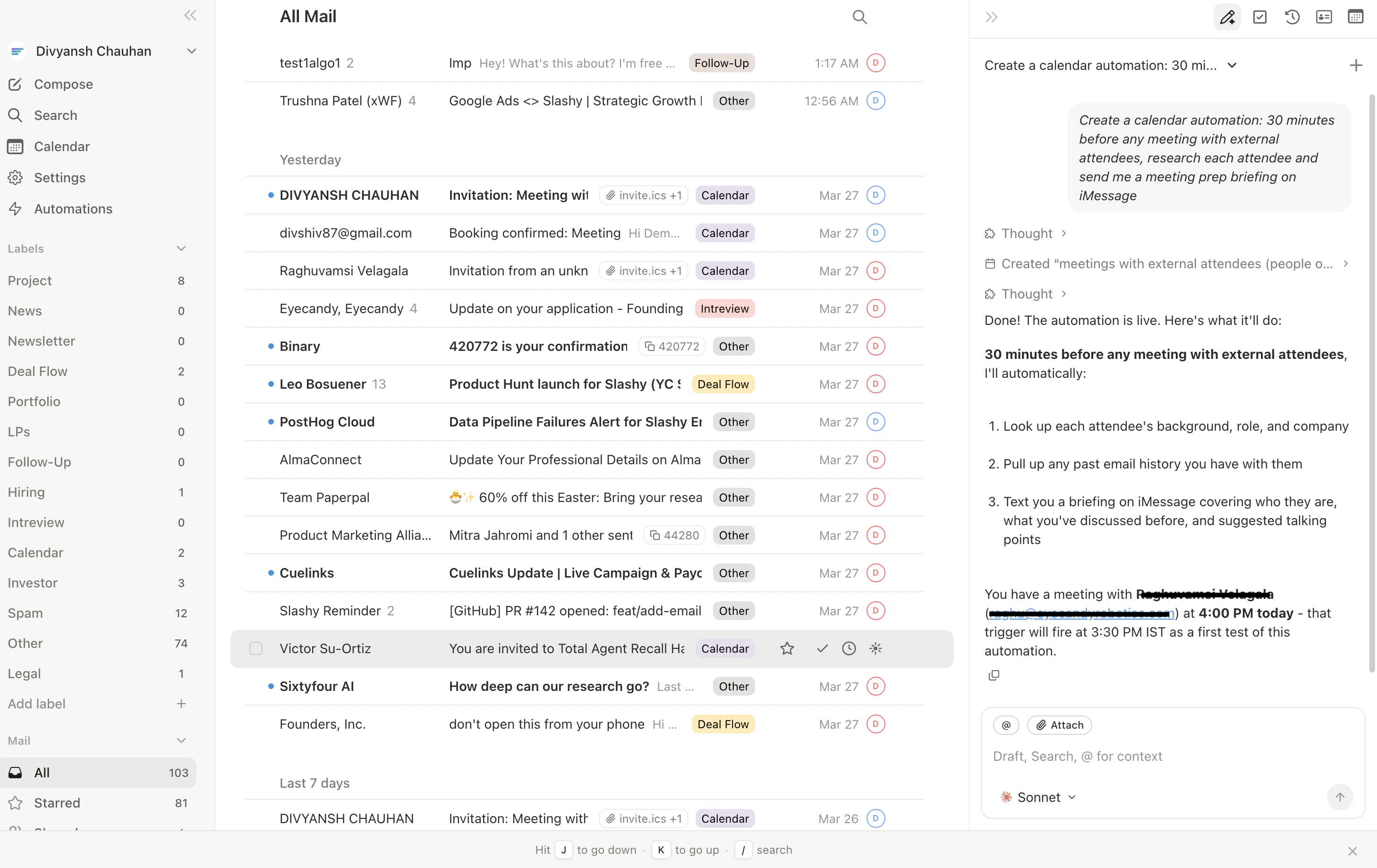
Type: *"Create a calendar automation: 30 minutes before any meeting with external attendees, research each attendee and send me a meeting prep briefing on iMessage."*
The agent creates a calendar trigger. Every external meeting gets a prep doc on your phone 30 minutes before.
 ## Customize the Trigger
* *"10 minutes before"* (last-minute prep)
* *"1 hour before"* (review over coffee)
* *"The evening before"* (next-day prep)
* *"Only for meetings with people I haven't met before"*
* *"Only for meetings with 'investor' or 'board' in the title"*
* *"For all meetings, including internal"*
* iMessage (requires iMessage agent)
* Email to your inbox
* Note in the agent sidebar
## Improving Quality Over Time
The prep docs get better as you use Slashy:
* **Memories build up** from email interactions -- contact facts appear in future preps
* **Email history deepens** the longer you use Slashy as primary
* **Enrichment data refreshes** each time, staying current
Manage the automation in **Settings > Automations**. Disable it temporarily for vacations or adjust the trigger criteria anytime.
***
## Related Articles
Essential automations every user should set up.
Connect your phone for briefing delivery.
How calendar-based automations work.
## Customize the Trigger
* *"10 minutes before"* (last-minute prep)
* *"1 hour before"* (review over coffee)
* *"The evening before"* (next-day prep)
* *"Only for meetings with people I haven't met before"*
* *"Only for meetings with 'investor' or 'board' in the title"*
* *"For all meetings, including internal"*
* iMessage (requires iMessage agent)
* Email to your inbox
* Note in the agent sidebar
## Improving Quality Over Time
The prep docs get better as you use Slashy:
* **Memories build up** from email interactions -- contact facts appear in future preps
* **Email history deepens** the longer you use Slashy as primary
* **Enrichment data refreshes** each time, staying current
Manage the automation in **Settings > Automations**. Disable it temporarily for vacations or adjust the trigger criteria anytime.
***
## Related Articles
Essential automations every user should set up.
Connect your phone for briefing delivery.
How calendar-based automations work.