> ## Documentation Index
> Fetch the complete documentation index at: https://help.slashy.com/llms.txt
> Use this file to discover all available pages before exploring further.
# Keyboard Shortcuts Cheatsheet
> Every keyboard shortcut in Slashy — global commands, navigation, inbox, compose, and calendar.
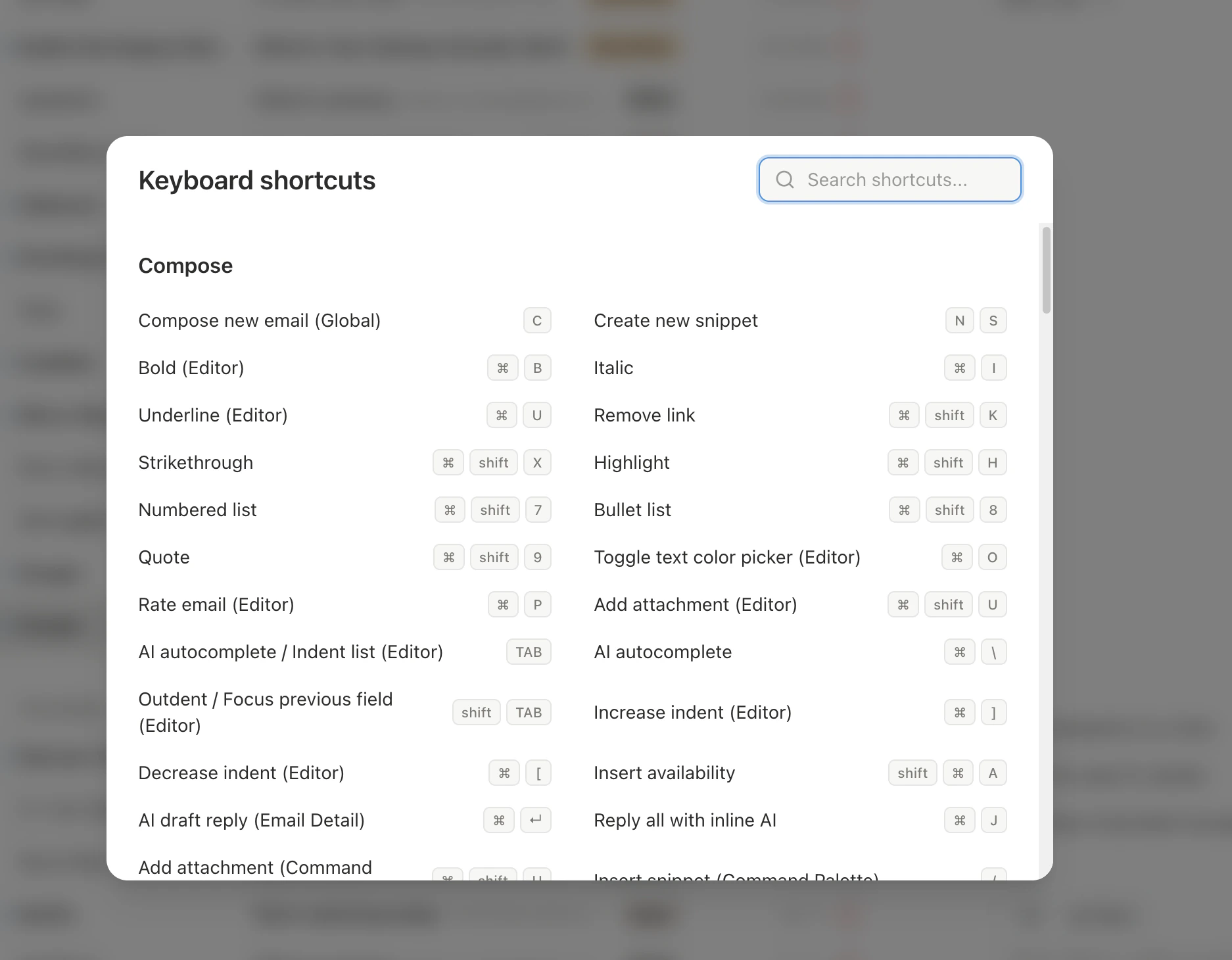
Press `Shift + ?` anywhere in Slashy to open the live keyboard shortcuts cheatsheet. Below is the same reference, searchable.
Slashy is built around the keyboard. Press `Shift+?` anytime to open the shortcut overlay.
 **How shortcuts work:** Single keys (`c` to compose), combos (`Cmd+Enter`), and sequences (`g i` — press `g`, release, then `i`). Sequences use a space. Combos use `+`.
| Shortcut | Action |
| --------- | --------------------------- |
| `Cmd+K` | Command palette |
| `c` | Compose new email |
| `/` | Search |
| `Shift+?` | Show shortcuts reference |
| `Cmd+B` | Toggle left sidebar |
| `Cmd+.` | Toggle right sidebar |
| `z` | Undo last action |
| `n s` | New snippet |
| `n l` | New label |
| `Cmd+,` | Settings |
| `Ctrl+/` | Copy link to current thread |
Press `g` then the second key to jump to a view.
| Shortcut | Goes to |
| -------- | -------------- |
| `g i` | Important |
| `g a` | All Mail |
| `g s` | Starred |
| `g d` | Drafts |
| `g e` | Done (Archive) |
| `g h` | Reminders |
| `g #` | Trash |
| `g t` | Sent |
| `g l` | Scheduled |
| `g o` | Other |
| `1` | Email view |
| `2` | Calendar view |
**Sidebar panels** — press `p` then:
| Shortcut | Opens |
| -------- | ------------- |
| `p a` | AI agent chat |
| `p t` | Tasks |
| `p o` | Recent opens |
| `p i` | Contact info |
| `p c` | Calendar |
**Inbox switching** (multiple accounts): `Alt+0` through `Alt+9`
**Filters** (toggles):
| Shortcut | Filter |
| --------- | ---------------------------- |
| `Shift+U` | Unread only |
| `Shift+S` | Starred only |
| `Shift+I` | Important only |
| `Shift+R` | No reply (awaiting response) |
| Shortcut | Action |
| --------------------- | ------------------------- |
| `j` / `k` | Move down / up |
| `Shift+J` / `Shift+K` | Select and move down / up |
| `Enter` | Open thread |
| `g g` | Jump to first thread |
| `Shift+G` | Jump to last thread |
| `Tab` / `Shift+Tab` | Next / previous label tab |
| `Cmd+A` | Select all threads |
**In a thread:**
| Shortcut | Action |
| ----------- | --------------------------------- |
| `Escape` | Close thread |
| `j` / `k` | Next / previous thread |
| `o` | Expand/collapse message |
| `Shift+O` | Expand/collapse all |
| `]` / `[` | Next / previous message in thread |
| `r` | Reply |
| `a` | Reply All |
| `f` | Forward |
| `e` | Archive |
| `s` | Star / Unstar |
| `u` | Mark read / unread |
| `#` | Trash |
| `!` | Report spam |
| `h` | Set reminder |
| `l` or `v` | Apply label |
| `b` | Create calendar event from email |
| `Cmd+O` | Show links in thread |
| `Cmd+Enter` | AI draft reply |
| Shortcut | Action |
| ----------------------------------------------- | ------------------- |
| `Cmd+Enter` | Send |
| `Cmd+Shift+Enter` | Schedule send |
| `Cmd+Option+H` (Mac) / `Ctrl+Alt+H` (Win/Linux) | Send and Snooze |
| `Tab` | Accept autocomplete |
| `Cmd+B` | Bold |
| `Cmd+I` | Italic |
| `Cmd+U` | Underline |
| `Cmd+Shift+X` | Strikethrough |
| `Cmd+Shift+H` | Highlight |
| `Cmd+Shift+7` | Numbered list |
| `Cmd+Shift+8` | Bulleted list |
| `Cmd+Shift+9` | Blockquote |
| `Cmd+K` | Insert link |
| `Cmd+O` | Text color |
| `Cmd+P` | AI email rating |
| `Cmd+Shift+U` | Attach file |
| `Cmd+Shift+S` | Insert snippet |
| `Shift+Cmd+A` | Insert availability |
Press `2` to switch to calendar view.
| Shortcut | Action |
| ----------- | --------------------------- |
| `j` / `k` | Next / previous time period |
| `h` / `l` | Navigate backward / forward |
| `t` | Jump to today |
| `g` | Go to specific date |
| `c` | Create new event |
| `Escape` | Close event detail |
| `Backspace` | Delete selected event |
## Tips for Learning
* **Start with five:** `c` (compose), `e` (archive), `j`/`k` (navigate), `Cmd+Enter` (send), `/` (search)
* **Use the command palette:** `Cmd+K` shows the matching shortcut next to each action
* **Patterns:** Navigation starts with `g`. Panels start with `p`. Learn the prefix, remember the letter.
* **Bulk select:** Hold `Shift` while pressing `J`/`K` to select threads, then apply any action to the selection
**How shortcuts work:** Single keys (`c` to compose), combos (`Cmd+Enter`), and sequences (`g i` — press `g`, release, then `i`). Sequences use a space. Combos use `+`.
| Shortcut | Action |
| --------- | --------------------------- |
| `Cmd+K` | Command palette |
| `c` | Compose new email |
| `/` | Search |
| `Shift+?` | Show shortcuts reference |
| `Cmd+B` | Toggle left sidebar |
| `Cmd+.` | Toggle right sidebar |
| `z` | Undo last action |
| `n s` | New snippet |
| `n l` | New label |
| `Cmd+,` | Settings |
| `Ctrl+/` | Copy link to current thread |
Press `g` then the second key to jump to a view.
| Shortcut | Goes to |
| -------- | -------------- |
| `g i` | Important |
| `g a` | All Mail |
| `g s` | Starred |
| `g d` | Drafts |
| `g e` | Done (Archive) |
| `g h` | Reminders |
| `g #` | Trash |
| `g t` | Sent |
| `g l` | Scheduled |
| `g o` | Other |
| `1` | Email view |
| `2` | Calendar view |
**Sidebar panels** — press `p` then:
| Shortcut | Opens |
| -------- | ------------- |
| `p a` | AI agent chat |
| `p t` | Tasks |
| `p o` | Recent opens |
| `p i` | Contact info |
| `p c` | Calendar |
**Inbox switching** (multiple accounts): `Alt+0` through `Alt+9`
**Filters** (toggles):
| Shortcut | Filter |
| --------- | ---------------------------- |
| `Shift+U` | Unread only |
| `Shift+S` | Starred only |
| `Shift+I` | Important only |
| `Shift+R` | No reply (awaiting response) |
| Shortcut | Action |
| --------------------- | ------------------------- |
| `j` / `k` | Move down / up |
| `Shift+J` / `Shift+K` | Select and move down / up |
| `Enter` | Open thread |
| `g g` | Jump to first thread |
| `Shift+G` | Jump to last thread |
| `Tab` / `Shift+Tab` | Next / previous label tab |
| `Cmd+A` | Select all threads |
**In a thread:**
| Shortcut | Action |
| ----------- | --------------------------------- |
| `Escape` | Close thread |
| `j` / `k` | Next / previous thread |
| `o` | Expand/collapse message |
| `Shift+O` | Expand/collapse all |
| `]` / `[` | Next / previous message in thread |
| `r` | Reply |
| `a` | Reply All |
| `f` | Forward |
| `e` | Archive |
| `s` | Star / Unstar |
| `u` | Mark read / unread |
| `#` | Trash |
| `!` | Report spam |
| `h` | Set reminder |
| `l` or `v` | Apply label |
| `b` | Create calendar event from email |
| `Cmd+O` | Show links in thread |
| `Cmd+Enter` | AI draft reply |
| Shortcut | Action |
| ----------------------------------------------- | ------------------- |
| `Cmd+Enter` | Send |
| `Cmd+Shift+Enter` | Schedule send |
| `Cmd+Option+H` (Mac) / `Ctrl+Alt+H` (Win/Linux) | Send and Snooze |
| `Tab` | Accept autocomplete |
| `Cmd+B` | Bold |
| `Cmd+I` | Italic |
| `Cmd+U` | Underline |
| `Cmd+Shift+X` | Strikethrough |
| `Cmd+Shift+H` | Highlight |
| `Cmd+Shift+7` | Numbered list |
| `Cmd+Shift+8` | Bulleted list |
| `Cmd+Shift+9` | Blockquote |
| `Cmd+K` | Insert link |
| `Cmd+O` | Text color |
| `Cmd+P` | AI email rating |
| `Cmd+Shift+U` | Attach file |
| `Cmd+Shift+S` | Insert snippet |
| `Shift+Cmd+A` | Insert availability |
Press `2` to switch to calendar view.
| Shortcut | Action |
| ----------- | --------------------------- |
| `j` / `k` | Next / previous time period |
| `h` / `l` | Navigate backward / forward |
| `t` | Jump to today |
| `g` | Go to specific date |
| `c` | Create new event |
| `Escape` | Close event detail |
| `Backspace` | Delete selected event |
## Tips for Learning
* **Start with five:** `c` (compose), `e` (archive), `j`/`k` (navigate), `Cmd+Enter` (send), `/` (search)
* **Use the command palette:** `Cmd+K` shows the matching shortcut next to each action
* **Patterns:** Navigation starts with `g`. Panels start with `p`. Learn the prefix, remember the letter.
* **Bulk select:** Hold `Shift` while pressing `J`/`K` to select threads, then apply any action to the selection