> ## Documentation Index
> Fetch the complete documentation index at: https://help.slashy.com/llms.txt
> Use this file to discover all available pages before exploring further.
# Does Slashy send emails on its own?
> How Slashy handles sending: drafts are for review, sending is always your call, and Read Mode can block all actions.
No. By default Slashy drafts and prepares, you decide what goes out. Nothing leaves your inbox until you press send, and you can lock that behavior down further with Read Mode.
## What Slashy does automatically
Slashy works ahead of you, but the automatic work stops short of sending:
* **AI drafts** are written and waiting in the reply box for you to read, edit, and send. A draft is never sent on its own.
* **Auto-reminders** nudge *you* to follow up. They do not email the other person.
* **Importance labels, search, and meeting prep** only read and organize. They take no outbound action.
## When Slashy can send
Slashy sends only when you tell it to, in one of two explicit ways:
1. **You press send** on a draft or an agent-prepared email.
2. **You set up an automation that sends.** Automations are opt-in. When you create one, you choose whether it drafts for your review or sends directly. A send-capable automation only exists because you built it that way.
Even when you ask the agent to "send this," it is acting on a direct instruction in that moment. It does not send unprompted.
## Read Mode: block all actions
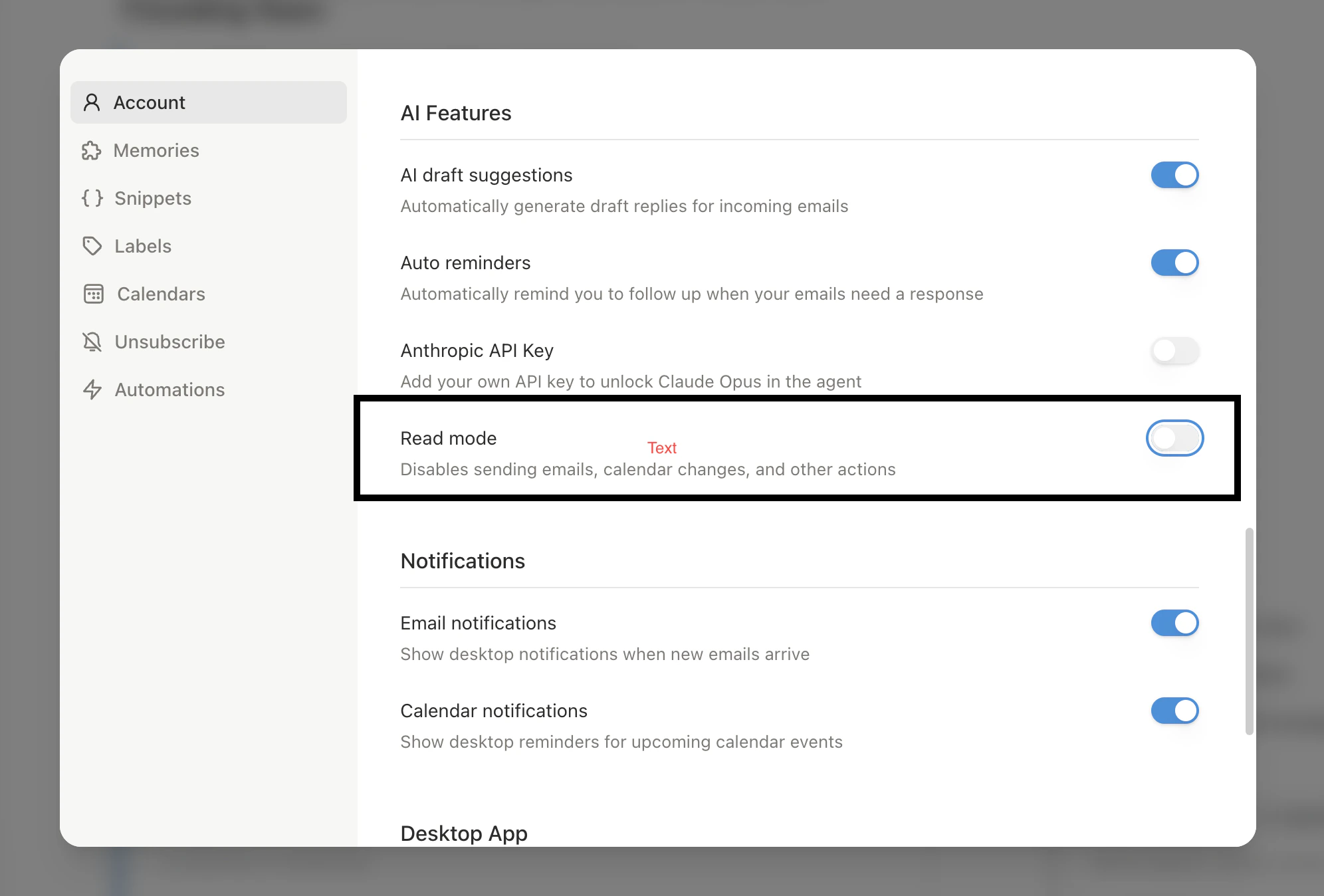
If you want a hard guarantee while you get comfortable, turn on Read Mode in **Settings, then Account** (also reachable from the agent sidebar). With Read Mode on, the agent can still search, read, research, and draft for your review, but it cannot send email or create, change, or delete anything. Send-capable automations pause while read-only ones keep running.
 ## Undo on send
When you do send, Slashy holds the message for a few seconds so you can pull it back. See [Scheduled send and undo](/features/email/scheduled-send).
Exactly what the agent will and will not do.
How drafts are written and reviewed.
What Slashy can and cannot access.
Build automations that draft or send on your terms.
## Undo on send
When you do send, Slashy holds the message for a few seconds so you can pull it back. See [Scheduled send and undo](/features/email/scheduled-send).
Exactly what the agent will and will not do.
How drafts are written and reviewed.
What Slashy can and cannot access.
Build automations that draft or send on your terms.