> ## Documentation Index
> Fetch the complete documentation index at: https://help.slashy.com/llms.txt
> Use this file to discover all available pages before exploring further.
# Notification Preferences
> Configure per-label triggers, email and calendar toggles, desktop notifications, mobile push, badge counts, and foreground suppression.
Slashy gives you granular control over what triggers notifications and how they are delivered. Configure per-label rules, toggle email and calendar notifications independently, and manage desktop and mobile settings.
 ## Per-Label Triggers
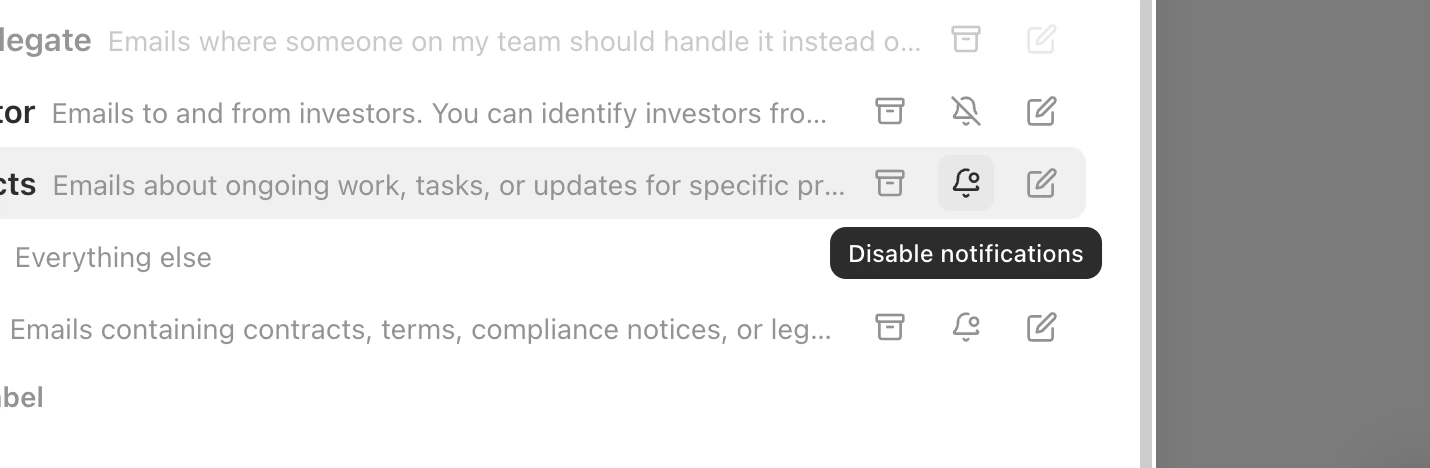
Each importance label has its own notification toggle. Get notified about emails that matter without being pinged for everything.
| Label | Default |
| -------------- | -------------------------------------- |
| **Important** | On — emails requiring your response |
| **Calendar** | On — meeting invites and notifications |
| **Billing** | Off |
| **Newsletter** | Off |
| **Other** | Off |
Configure per-label triggers in **Settings > Labels** by editing individual labels.
Creating a "VIP Clients" label? Enable notifications so you are immediately alerted when those emails arrive.
## Global Toggles
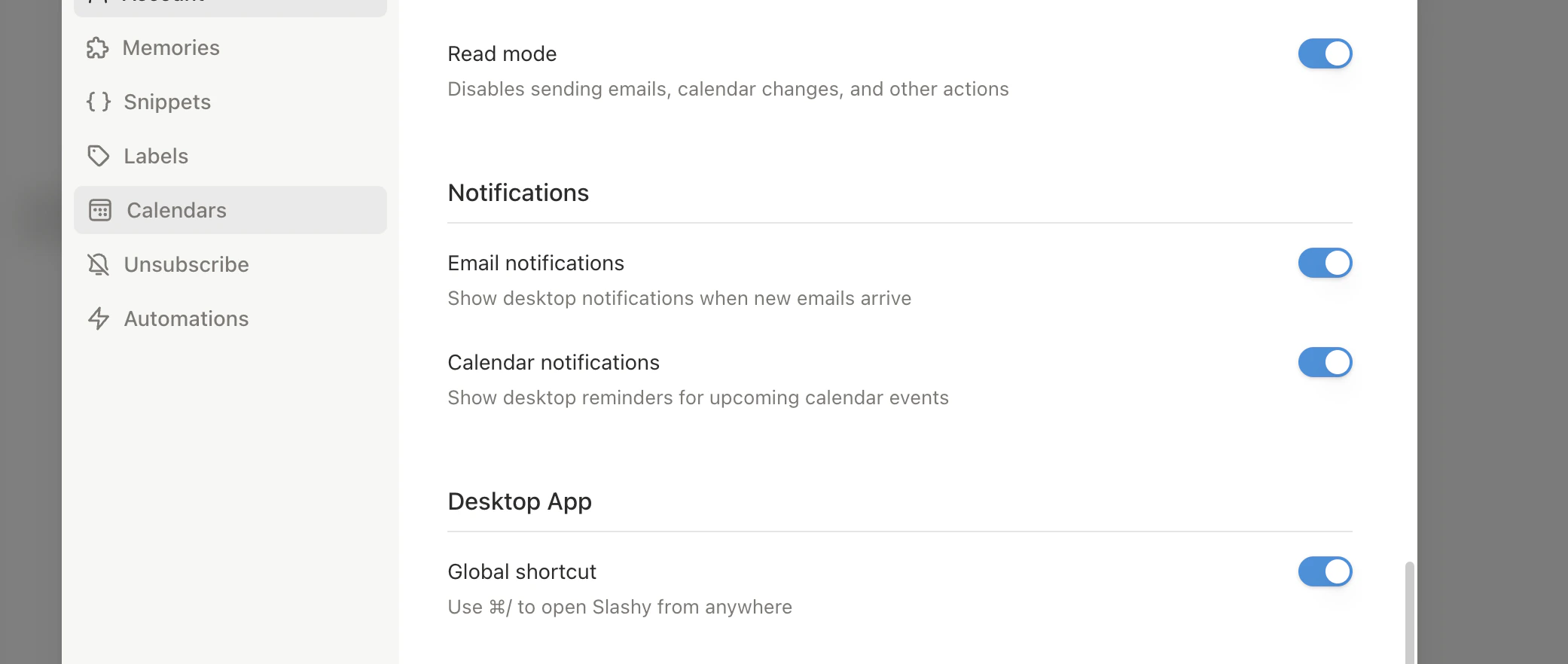
Two independent master switches in **Settings > Account**:
* **Email notifications** — controls all email-related notifications. When off, no email alerts regardless of per-label settings.
* **Calendar notifications** — controls event reminders, new invites, and event changes. Independent from email.
## Desktop Notifications (macOS)
The desktop app delivers notifications through macOS Notification Center:
* **Banner alerts** in the top-right corner
* **Notification Center history** for past alerts
* **Badge count** on the dock icon
Make sure Slashy has notification permissions in **System Settings > Notifications > Slashy** on your Mac.
## Mobile Push Notifications
The iOS app uses APNs and FCM for push notifications, even when the app is closed. Triggered by:
* New emails in notifiable labels
* Email and calendar trigger automation matches
* Agent reminder invocations
Toggle in the Slashy mobile app under **Settings > Notifications**.
## Per-Label Triggers
Each importance label has its own notification toggle. Get notified about emails that matter without being pinged for everything.
| Label | Default |
| -------------- | -------------------------------------- |
| **Important** | On — emails requiring your response |
| **Calendar** | On — meeting invites and notifications |
| **Billing** | Off |
| **Newsletter** | Off |
| **Other** | Off |
Configure per-label triggers in **Settings > Labels** by editing individual labels.
Creating a "VIP Clients" label? Enable notifications so you are immediately alerted when those emails arrive.
## Global Toggles
Two independent master switches in **Settings > Account**:
* **Email notifications** — controls all email-related notifications. When off, no email alerts regardless of per-label settings.
* **Calendar notifications** — controls event reminders, new invites, and event changes. Independent from email.
## Desktop Notifications (macOS)
The desktop app delivers notifications through macOS Notification Center:
* **Banner alerts** in the top-right corner
* **Notification Center history** for past alerts
* **Badge count** on the dock icon
Make sure Slashy has notification permissions in **System Settings > Notifications > Slashy** on your Mac.
## Mobile Push Notifications
The iOS app uses APNs and FCM for push notifications, even when the app is closed. Triggered by:
* New emails in notifiable labels
* Email and calendar trigger automation matches
* Agent reminder invocations
Toggle in the Slashy mobile app under **Settings > Notifications**.
 ## Badge Count
Slashy shows unread counts on the app icon (dock on desktop, home screen on mobile). The count updates in real time as you read, archive, or receive emails. Toggle with **Show unread counts** in **Settings > Account**.
## Foreground Suppression
When you are actively viewing a thread, Slashy suppresses notifications for that specific thread. No redundant alerts for emails you are already reading. Other threads notify normally.
## Notification Sources
| Source | Controlled By |
| ---------------------------------- | -------------------------------------- |
| New emails in notifiable labels | Per-label toggle + global email toggle |
| Calendar event reminders | Calendar notifications toggle |
| New calendar invites | Calendar label notification toggle |
| Email/calendar trigger automations | Always notified |
| Agent reminders | Always notified |
## Quick Reference
| Action | Where |
| ----------------------------- | -------------------------------------------- |
| Toggle email notifications | **Settings > Account** |
| Toggle calendar notifications | **Settings > Account** |
| Toggle badge counts | **Settings > Account > Show unread counts** |
| Per-label notifications | **Settings > Labels > \[label]** |
| Mobile settings | Slashy app **Settings > Notifications** |
| macOS permissions | **System Settings > Notifications > Slashy** |
How AI sorts email into importance labels.
Navigate all views, filters, and multi-inbox switching.
## Badge Count
Slashy shows unread counts on the app icon (dock on desktop, home screen on mobile). The count updates in real time as you read, archive, or receive emails. Toggle with **Show unread counts** in **Settings > Account**.
## Foreground Suppression
When you are actively viewing a thread, Slashy suppresses notifications for that specific thread. No redundant alerts for emails you are already reading. Other threads notify normally.
## Notification Sources
| Source | Controlled By |
| ---------------------------------- | -------------------------------------- |
| New emails in notifiable labels | Per-label toggle + global email toggle |
| Calendar event reminders | Calendar notifications toggle |
| New calendar invites | Calendar label notification toggle |
| Email/calendar trigger automations | Always notified |
| Agent reminders | Always notified |
## Quick Reference
| Action | Where |
| ----------------------------- | -------------------------------------------- |
| Toggle email notifications | **Settings > Account** |
| Toggle calendar notifications | **Settings > Account** |
| Toggle badge counts | **Settings > Account > Show unread counts** |
| Per-label notifications | **Settings > Labels > \[label]** |
| Mobile settings | Slashy app **Settings > Notifications** |
| macOS permissions | **System Settings > Notifications > Slashy** |
How AI sorts email into importance labels.
Navigate all views, filters, and multi-inbox switching.